I’ve been meaning to post the pictures that my friend Austin Laugesen took for the judging of the 2 finalist groups for the app-athon. Out of respect for privacy I will not chose to identify the contestants or the winning/losing group. I start working at Microsoft Full Time January 7th 2013, I am very excited and I look forward to building my blog with my more useful information pertinent to Windows Phone Development and possibly to some Windows 8 as well. Happy New Years!
Category: Fall 2012 UIC ACM+BOA App-athon
Thank you again for those who came out on a Mon night 6pm to 7pm to listen to my first presentation given on Windows Phone 7.5 app development. This app-athon series is very difficult for one person to organize as well as mentor and teach everyone how to create an app for Windows Phone. So I appreciate your patience and understanding as I do my best to provide you guys with the best resources available to help you make an app.
For those who do not know who I am yet, I advise you to click on the about page if you are curious to what my qualifications are. Note I’m not posting the slide deck because it was created using Office 2013 Preview and it will not come out appropriately when using 2010.
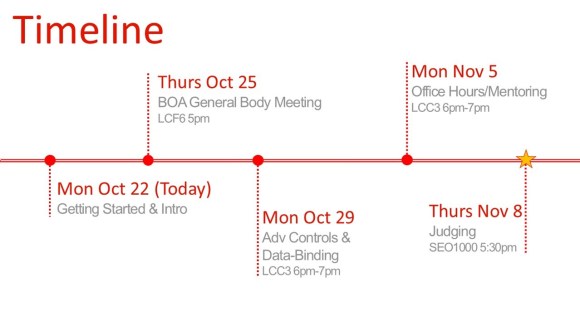
Here is the timeline of the events as it stands.
Monday we covered getting started and I’ll expand on this after mention these other events.
Thursday I will be speaking for a 10-15 minutes at Bioengineering Organizational Alliance at the UIC. There I will be going over the same slides as Monday but I will not be talking about any development related topics as much as I did Monday.
Monday 29th
we will be going over how to get controls into your project and how to data bind to your UI while using proper techniques including Background Workers and displaying of progress bar’s when necessary.
Monday Nov 5th
I will be asking Garrett another former intern at Microsoft returning to them full time (additionally he was my partner for creating our app for Windows Phone), to come help me mentor and answer programming questions related to C# .NET and Windows Phone. I will be doing the same helping solve problems which groups may run into and review UI’s as well as lend my phone for testing. Feel free to email me to arrange other times to test my phone in SEL 2260 CS lounge.
Thursday Nov 8th Austin from Windows Phone Division (Software Development Engineer in Test) will be at the ACM general meeting to give a short presentation as well as judge the progress made on apps. He will decide who is the winner and the winning group will receive prizes. THIS does not mean you have to have your app 100% finished but it rather is an opportunity to demonstrate what you have accomplished in the allotted time. Prizes are not going to be announced until then because the focus on this is to demonstrate your capabilities as students not to win prizes (plus don’t expect very expensive gifts for 4 winners at such a small event).
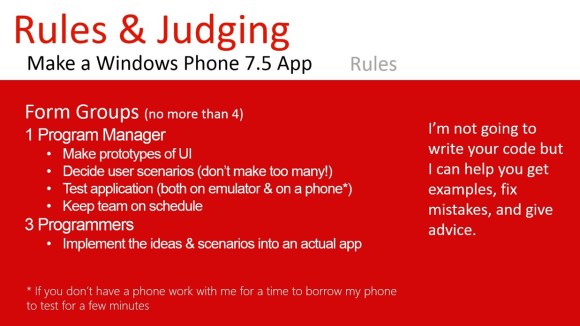
Groups of no more than 4, 1 person is ok but I don’t recommend it because it may be a lot of work for someone who does not have a lot of experience programming. As I explained, Program Managers are essential meeting deadlines, making sure your app is too complex in term of functionality as well as the usage of the application. Expanding on that, Program managers should help by drawing sketches of what the application should look like and what features are important and should be made by the programmers.
Think about the Alarm clock application, 1 scenario the user wants to just set an alarm to go off at a certain time. A second scenario the user wants to set a reoccurring alarm based on days of the week or a certain day. That is how you decide user scenarios. Program managers should be the ones to keep your team on track as well as work with me to test the application. Make sure you guys just pick and idea and don’t fight about whose idea is better because you don’t have much time. Once you learn how to make apps you can make as many as you want so work together on this.
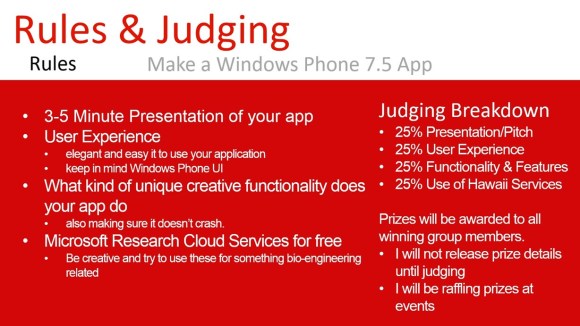
You will be given a short presentation of what your app is capable of doing and how it works etc. Your group will find that is not very much time so make sure to keep in mind what are the special features of your app and what is unique about it.
User Experience is a broad topic but what you need to keep in mind is how pretty, efficient, fast, responsive, consistent relative to Windows Phone User Experience. There are resources available at dev.windowsphone.com to guide you along the right track, you are also more than welcome to show me mock sketches or pictures of your ideas.
Creativity and functionality is also being judged, so try to make something that is different while also demonstrating cool features or functionality.
Microsoft Research Cloud Services (AKA Hawaii Services) are free to use for any academic purposes as well as for free applications in the marketplace. Remember how you could use these for bio-engineering related purposes (magnifier app, or hearing impaired aid, directions app when you don’t know where you are). Be creative!
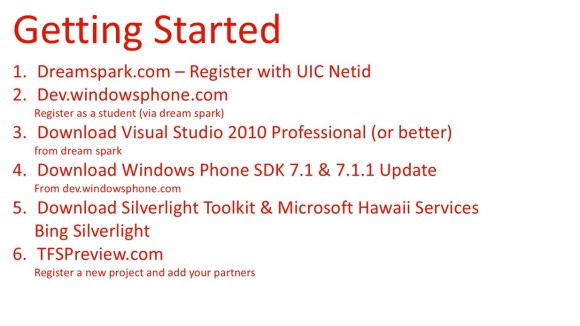
Register at Dreamspark with your UIC Netid. Once you do that you can download Visual Studio 2010 Professional or better from Dreamspark. You need 2010 because 2012 does not support Windows phone 7.5 SDK. Professional is required if you are working a group, Professional provides source control so people can work on the same project at the same time.
Now register on dev.windowsphone.com as a student using your dreamspark account, this is important because it saves us $99 to test on a device and publish to the marketplace. You will need a Windows live ID in order to register on Windows Phone Dev Center.
You should then download the Windows Phone SDK and the update for these, at this point Visual Studio 2010 will say that it needs to be updated to service pack 1. This is necessary to get the SDK working. Once these are downloaded and installed you can make basic apps.
But if you are looking for more advanced controls to do unique things such as drop down boxes and date and time pickers or more then you should download the Silverlight Toolkit. When adding these libraries to your project make sure you copy the dll’s into your project folder then add them to referenced libraries. Otherwise your project will break if your partners don’t have these libraries.
Project Hawaii has lots of same code when you download it.
Lastly you should create a project using your Windows Live ID. TFSPreview is a free source control you use. It’s free because it is a preview we don’t know how long we will be able to use the TFS source control. So make sure you have local copy of your project on your PC. You can also host your source control at Codeplex.com but it requires that you make your project code publically available for viewing.
Lastly
UI and other things which I took for the presentation is available on www.dev.windowsphone.com .
Thanks to for the ACM for sponsoring promotion and Microsoft for supplying prizes!
 Stacking Opportuntity