Categories
Uncategorized

Autorotation with Managed Identity

Previously I introduced certificate rotation and why it’s important to running any cloud service. This post will describe some successful high-level concepts to enable a complete secret rotation story using Azure services.

Azure services like Storage or Maps? Invest in Azure AD Managed Identities

Storage is known for the shared secret and shared-access-signature authentication and authorization implementations. For some time now Azure has been consolidating an Azure AD authentication and role-based access control for the APIs.

This solution solves: credential management, rotation, and fine grain access control. Previously you must securely store these secrets in application configuration or secret stores and create processes for updating these secrets and deploying them safely.

Managed Identity creates an Azure AD service principal and abstracts the phrase “Get access token for Storage|Maps|etc” without the cost of certificate management or secret rotation. You can directly assign access on the Azure Storage account or at a higher-level scope such as a resource group or subscription. This works excellent for applications using service to service authentication.

It removes any need for a secret store such as Key Vault. See the picture showing that the application in the Azure VM calls Azure storage using Managed identity from the instance metadata service. There are many SDK choices to use when using the IMDS endpoint to retrieve the access token for a service. Since IMDS is REST endpoint you could even bring your own library. However, I would suggest looking into the recommended and supported SDKs from Microsoft.

MSAL and ADAL are not supported

That’s disappointing right? Good news is the Azure SDK is to be the intended SDK for the replacement of Azure services. There are existing libraries such as the Azure Service Authentication Library which also works too. ASAL library is the current recommendation for service to service authentication to Key Vault but this library can be used for other Azure services too. MSAL is the next recommendation because it is written for the strict focus of authentication with Azure AD instead of Azure Service SDK integration.

For the record

This is the production implementation for accessing Key Vaults and Storage services in Azure Maps. Currently we have been operating with it for about 1.5 years with no live site incidents related to these components.

Azure Resource Manager Template

I’ve authored an example to setup Azure RBAC using an Azure Resource Manager template. The purpose of the quick-start template is to show easy it can be to assign an application access to an Azure Maps account using a Managed Identity or other Service Principal.

The second step to using the quick-start template is to create some Azure resource with a Managed Identity. Check out the Managed Identity documentation on providing a user assigned identity from our quick-start template to a Virtual Machine Resource.

You must reference your created User Assigned Managed Identity and apply it to your resource with a template like:

{
    "apiVersion": "2018-06-01",
    "type": "Microsoft.Compute/virtualMachines",
    "name": "[variables('vmName')]",
    "location": "[resourceGroup().location]",
    "identity": {
        "type": "userAssigned",
        "userAssignedIdentities": {
            "[resourceID('Microsoft.ManagedIdentity/userAssignedIdentities/',variables(''))]": {}
        }
     }
}

One you deploy your code using one of the SDKs mentioned you can call the Azure Maps REST APIs without any need to store the shared key in a Key Vault.

Categories
Uncategorized

What is serious autorotation?

Last post I mentioned how to setup the original TLS certificates in Azure Web Apps. I mentioned this history because it is the common history which most of Azure customers have built web applications. Azure has been busy creating a more secure platform tackling these fundamental problems which every customer experience. This post I’ll introduce what autorotation is.

Autorotation is the complete replacement of certificates in application use without human touch.

It’s the responsibility of the software engineers to setup an engineering system or application workflow to help achieve this.

Why is autorotation important?

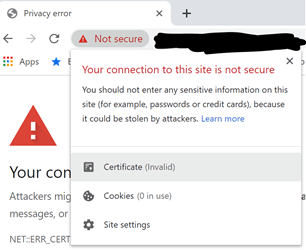
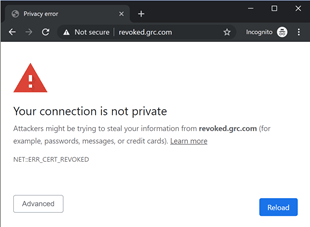
As a junior software engineer or even a consumer you may have seen this type of error when browsing websites.

This is the simplest explanation of how consumer information can be compromised and even your application may be vulnerable to attacks. It reduces the attack vector for any form of public-private key pair using certificates. Rotation every 90 days or more frequently in an automated removes the possibility of an attack to exploit use of a compromised private key + public key pair. If you read more on security StackExchange there is an excellent question about the purpose of rotating TLS certificates.

The main point is to avoid the need of CRL or OSCP to revoke a compromised certificate.

  • Certificate Revocation List (CRL) maintains a list of endpoints for which the certificate should verify if it has been revoked.
  • OSCP protocol is used to communicate to a server to indicate whether the certificate has been revoked.

A CRL check is what makes your browser report an Error and prevent attackers from stealing information:

Before dismissing this as low priority:

Consider no support for Android/Chrome on CRL or OSCP. The argument is that is that in most cases if network connectivity for OSCP is blocked by the attacker the application will soft-fail and still accept the certificate as validate. The only mitigation is to sign the application and prevent any unsigned application from running. This would prevent interception of any network traffic including that of OSCP checks. Additional reading is found on this StackOverflow question. The post will eventually take you to a great explanation of why CRLs and OSCP is a weak form of protection.

The point is:

Short lived certificates are an easy and reliable way to prevent private key extended exposure.

Next week, I’ll go into more details about how a high scale Azure service would implement something like this.

Categories
Uncategorized

Story from the past: TLS Certificate Headache

When I started my career, I had no focus on infrastructure at all. The work in commerce was a typical set of features where I would implement some logic that would help produce an automated solution to electronic signatures for licensing agreements between Microsoft partners and customers. As a software engineer, I did not bother myself with the behind the scenes essentials to run a web service or site because it just did not interest me. Many software engineers try to focus our work on the features which are core to the business and when we encounter this other work such as setting up foundational components we cringe.

I remember days in my commerce team where we worked with service engineers. For those who don’t know what a service engineer is, they typically operate and maintain the online service. I’ve had the pleasure to work with some great service engineers. At the time I was assigned someone who made you feel like you are hand holding an experienced professional through their job. I was working on a new Azure web service responsible to produce and maintain the agreement documents for customers. It was based on a new Azure technology called Azure Web Sites and it was going to make team’s work much easier to produce the solution we needed. It turns out that it was much easier to develop and deploy my code to this platform compared to previous Azure Cloud Services. When the time came for production we had to deploy to multiple regions and introduce a traffic manager for failover situations and simple latency improvements.

Adding this traffic manager created my headache. The service engineer at the time did not understand why the browser would return a big red error saying the web site is not secure but it would be secure when you went to the site directly at WestUsSvc.azurewebsites.net. Well, you can read all about TLS protocols and understand how the server will provide a handshake to your browser but I will save you some time. He needed to provide a certificate with a subject alternate name to support the svc.trafficmanager.net.

This means that we need to provide certificate(s) and set up them up for HTTPS for the service. There are a few options to do this:

  1. Provision a single certificate that supports the union list of these 3 names.
  2. Provision 2 certificates with the region entry plus the traffic manager entry. (Preferred / Recommended)

It was a very odd situation because there was no web site or pages to be viewed in the browser. So, there was no real practical reason to address this issue. However, with anything, I suggest you take it as a teaching opportunity and help the service engineer. I showed him that he must create these certificates and installed them for SSL in the Azure Web Site.

Moral of the story

The moral of the story is that you should involve yourself in the infrastructure even if it’s not pretty or sexy. It keeps the features running and it’s critical to your success. In more recent days we build off these common problems and address a lot of the manual work of managing these problems. I’ll explain in another post how we can get our hands off these manual processes and leverage our wok in the Azure / Microsoft stack. If you are interested in the history of Azure Websites take a look at ScottGu’s blog post from 2015.

Categories
Uncategorized

Telemetry with Identity integration

A balance of information

One recent challenge I have faced has been finding the right fit of metrics and log events to solve the variety of problems we face in monitoring our services. It is a common problem which usually supported by existing metrics and events. Developers and operators can find themselves straddled between request/response and identity. A requirement such as the observation of an account resource with respect to usage of APIs means creating a common correlation. The need to preserve privacy is a fundamental element which should be included in observability. Diligence should be practiced when picking the right platform. Careless implementation can create immense trouble for a product and company.

Experienced observability and telemetry experts often decompose request and response telemetry into 3 availability speeds: Hot, Warm, and Cold. Without diving too much into details:

  • Hot: 5 minutes or less of numerical count-based data with a set of dimensions. These are called metrics.
  • Warm: 15 minutes of an object-based event which may represent state or transaction at the point in time.
  • Cold: 30 days or longer which is often derived from the Warm path and optimized for longer term storage and usage.

These 3 categories can typically make up all parts of observability in a mature product and service.

The common established metrics in the operations of the service might be a latency metric with a set of dimensions.

[latencyMs, OperationResult, OperationName, Region]
[100, "Success", "Search", "East US"]

These dimensions may not include any customer identifying information. Secondly, it is very likely that a request/response event (Warm path) is currently being emitted.

{
	"host": "service.mydomain.com",
	"requestPath": "/api/search/",
	"queryString": "?query=abc%20def",
	"requestHeaders": "Accept: application/json
	Authorization: Bearer xxxxxx",
	"httpMethod": "GET",
	"responseStatusCode": 200,
	"responseHeaders": "…",
	"clientIpAddress": "xxx.xxx.xxx.xxx",
	"responseBody": "{…}",
	"correlationId": "[guid]"
}

This event may capture request path, query strings, http method, headers, response status code, and more. This event is specific to request/response and currently it does not indicate any form of account or identity information either. Headers and query strings might be capturing customer identity information and we will come back to this later to handle this situation. This can be a concern as it relates to privacy and security of a customer’s account.

Understanding the pipeline

Conflating these metrics or events with additional information accommodating the identity needs can cause confusion and lead to the opposite intention. For authentication we typically must execute before any route or individual operation names may be available to our instrumentation code. This can lead to cases where authentication is denied and “OperationName” can result in an empty or null value. There may also be cases where some APIs are made anonymous and do not require any authentication. This may result in a large influx of null or default values for any identity dimensions or fields. This can be exacerbated in cases of supporting multiple authentication protocols and complex authorization policies. In these cases, adding dimensions or properties may distract or mislead the Dev/Ops individual during troubleshooting.

This is a very simplified process view of the pipeline for requests into a service. As you can see if authentication or authorization is denied; the request will not proceed to API for the OperationName or OperationResult. Similarly, we can see how an Anonymous API must contain a default or some placeholder values for anonymous to clear any possible confusion. If we did not provide any placeholder values, we could see cases where the metric dimensions cannot helpfully distinguish identity. I speak about this because we currently face this challenge. We want account information to be made available concisely, but we also want to know if the customer is struggling with problems using our identity implementation.

In our production we have a case where a we support Azure AD Bearer token authentication with the addition of Azure Role Based access control. One of our customers had created a website and had configured everything related to Azure AD App Registrations and was able to successfully authenticate to Azure AD. However, the problem was in the configuration of the access control. When authenticating with Azure AD the OAuth 2.0 bearer token contains an ID for the user or application. This ID was not configured in the access control for the account and resulted in authorization denies. The customer reached out on GitHub and I was able to diagnose the issue with a mix of metrics and logging events. However, this could be a better experience and so I’m currently working on how to make this quicker and easier to identify for us as well as provide the necessary self-service help for customers.

Guidance to a solution

To solve these types of problems I’m approaching it from the point of a view of identity as a contained responsibility. When an software engineer is developing an application, they care about identity as the necessary work to enable the actual business logic. When customers cannot access their accounts or use the APIs it is very important to identify the cause separately with clear error codes and messages.

When a customer receives an authentication deny that means the customer was not identified. We can assume there is a request correlationId on the existing request warm path event. Any identifying request information can be found there including authentication headers or query strings.

What we need is a metric count of authentication denies to quickly identify the cause. Adding a simple trace message event for warm path which can correlate on the same correlationId should give an easy way to troubleshoot the authentication for the given request. The additional metric will be used to aggregate and identify common user errors or potential attacks on the service.

A metric count of authentication success will show the most used authentication scheme(s) such as Azure AD or Shared Key based on the AccountId. The success of authentication is now confirmed, and no additional information should be needed.

A metric count of authorization denies for complex authorization rules. If an account has specific policies such as group membership requirements, SKU based access such as a free and paid, or Role Based Access Control policies then defining a metric like below will be critical for support.

[latencyMS, policy, errorCode, authenicationScheme, accountId]

I recommend enabling any necessary auditing by use of the existing warm path events. If there is a need to add more details to authentication you can extend on this guidance in the places where you insert the metrics. However, with the combination of the new metrics and any existing telemetry there is a good possibility that the data can be exported to cold storage for any necessary auditing.

On privacy

As someone who works on the fundamentals of an Azure service, we value compliance and higher set of goals for security and privacy. Request headers and query strings can add values such as full bearer tokens or symmetric keys. We created a library for header / query string redaction of customer sent parameters. This is critical today and it is necessary to maintain or build the trust of our customers. As an example, there was a case with Facebook which exposed millions of passwords to 20k employees in plain text. As mentioned, there were a series of errors which led to this but as a developer it is our responsible to care about these issues. Redaction could have provided some basic identity protection which may have just stopped this from happening.

For those concerned about losing the ability to troubleshoot authentication while using redaction there are solutions available. I mentioned above the definition of specific error codes to triage the actual issue as one solution. Adding in a short-life warm path event in a contained module may be a necessary work item to solve this problem. The most important thing is to not let the event to be exposed for a long period of time. There should be proper production processes in place to ensure the least amount of people have access to this data.

Categories
Fall 2012 UIC ACM+BOA App-athon Windows Phone 7.5

November 6th UIC Appathon for Windows Phone 7.5

I’ve been meaning to post the pictures that my friend Austin Laugesen took for the judging of the 2 finalist groups for the app-athon. Out of respect for privacy I will not chose to identify the contestants or the winning/losing group. I start working at Microsoft Full Time January 7th 2013, I am very excited and I look forward to building my blog with my more useful information pertinent to Windows Phone Development and possibly to some Windows 8 as well. Happy New Years!

This slideshow requires JavaScript.

Categories
Fall 2012 UIC ACM+BOA App-athon Windows Phone 7.5

UIC ACM+BOA SIG Windows Phone App-athon Event 1

Thank you again for those who came out on a Mon night 6pm to 7pm to listen to my first presentation given on Windows Phone 7.5 app development. This app-athon series is very difficult for one person to organize as well as mentor and teach everyone how to create an app for Windows Phone. So I appreciate your patience and understanding as I do my best to provide you guys with the best resources available to help you make an app.

For those who do not know who I am yet, I advise you to click on the about page if you are curious to what my qualifications are. Note I’m not posting the slide deck because it was created using Office 2013 Preview and it will not come out appropriately when using 2010.

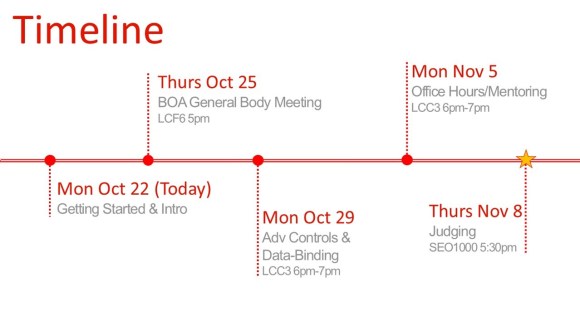
Here is the timeline of the events as it stands.

Monday we covered getting started and I’ll expand on this after mention these other events.

Thursday I will be speaking for a 10-15 minutes at Bioengineering Organizational Alliance at the UIC. There I will be going over the same slides as Monday but I will not be talking about any development related topics as much as I did Monday.

Monday 29th
we will be going over how to get controls into your project and how to data bind to your UI while using proper techniques including Background Workers and displaying of progress bar’s when necessary.

Monday Nov 5th
I will be asking Garrett another former intern at Microsoft returning to them full time (additionally he was my partner for creating our app for Windows Phone), to come help me mentor and answer programming questions related to C# .NET and Windows Phone. I will be doing the same helping solve problems which groups may run into and review UI’s as well as lend my phone for testing. Feel free to email me to arrange other times to test my phone in SEL 2260 CS lounge.

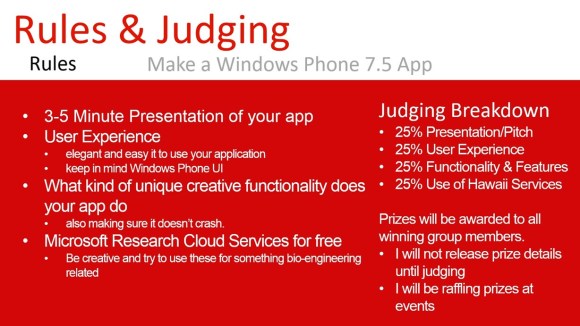
Thursday Nov 8th Austin from Windows Phone Division (Software Development Engineer in Test) will be at the ACM general meeting to give a short presentation as well as judge the progress made on apps. He will decide who is the winner and the winning group will receive prizes. THIS does not mean you have to have your app 100% finished but it rather is an opportunity to demonstrate what you have accomplished in the allotted time. Prizes are not going to be announced until then because the focus on this is to demonstrate your capabilities as students not to win prizes (plus don’t expect very expensive gifts for 4 winners at such a small event).

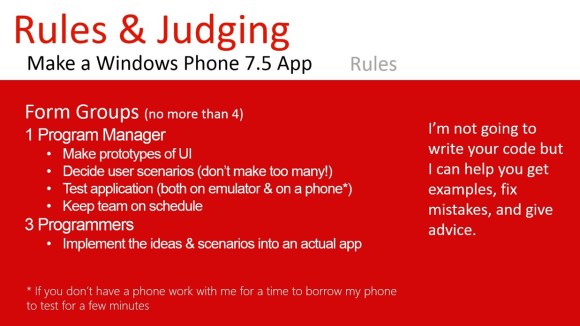
Groups of no more than 4, 1 person is ok but I don’t recommend it because it may be a lot of work for someone who does not have a lot of experience programming. As I explained, Program Managers are essential meeting deadlines, making sure your app is too complex in term of functionality as well as the usage of the application. Expanding on that, Program managers should help by drawing sketches of what the application should look like and what features are important and should be made by the programmers.

Think about the Alarm clock application, 1 scenario the user wants to just set an alarm to go off at a certain time. A second scenario the user wants to set a reoccurring alarm based on days of the week or a certain day. That is how you decide user scenarios. Program managers should be the ones to keep your team on track as well as work with me to test the application. Make sure you guys just pick and idea and don’t fight about whose idea is better because you don’t have much time. Once you learn how to make apps you can make as many as you want so work together on this.

You will be given a short presentation of what your app is capable of doing and how it works etc. Your group will find that is not very much time so make sure to keep in mind what are the special features of your app and what is unique about it.

User Experience is a broad topic but what you need to keep in mind is how pretty, efficient, fast, responsive, consistent relative to Windows Phone User Experience. There are resources available at dev.windowsphone.com to guide you along the right track, you are also more than welcome to show me mock sketches or pictures of your ideas.

Creativity and functionality is also being judged, so try to make something that is different while also demonstrating cool features or functionality.

Microsoft Research Cloud Services (AKA Hawaii Services) are free to use for any academic purposes as well as for free applications in the marketplace. Remember how you could use these for bio-engineering related purposes (magnifier app, or hearing impaired aid, directions app when you don’t know where you are). Be creative!

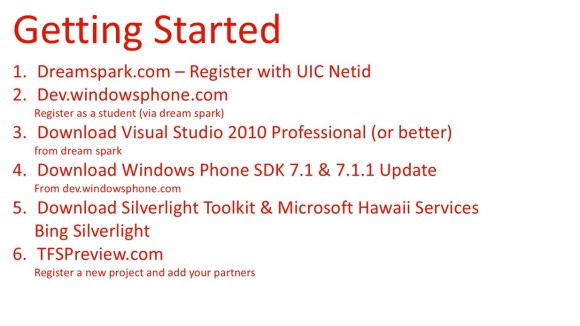
Register at Dreamspark with your UIC Netid. Once you do that you can download Visual Studio 2010 Professional or better from Dreamspark. You need 2010 because 2012 does not support Windows phone 7.5 SDK. Professional is required if you are working a group, Professional provides source control so people can work on the same project at the same time.

Now register on dev.windowsphone.com as a student using your dreamspark account, this is important because it saves us $99 to test on a device and publish to the marketplace. You will need a Windows live ID in order to register on Windows Phone Dev Center.

You should then download the Windows Phone SDK and the update for these, at this point Visual Studio 2010 will say that it needs to be updated to service pack 1. This is necessary to get the SDK working. Once these are downloaded and installed you can make basic apps.

But if you are looking for more advanced controls to do unique things such as drop down boxes and date and time pickers or more then you should download the Silverlight Toolkit. When adding these libraries to your project make sure you copy the dll’s into your project folder then add them to referenced libraries. Otherwise your project will break if your partners don’t have these libraries.

Project Hawaii has lots of same code when you download it.

Lastly you should create a project using your Windows Live ID. TFSPreview is a free source control you use. It’s free because it is a preview we don’t know how long we will be able to use the TFS source control. So make sure you have local copy of your project on your PC. You can also host your source control at Codeplex.com but it requires that you make your project code publically available for viewing.

Lastly

UI and other things which I took for the presentation is available on www.dev.windowsphone.com .

Thanks to for the ACM for sponsoring promotion and Microsoft for supplying prizes!

Categories
Windows 8

Windows 8 App development for students

The embedded video is a perfect example of a difference in performance between Windows 7 and Windows 8, Two Remote Desktop Connections streaming video. Awesome. BTW good resource to get stuff to develop apps.

http://www.microsoft.com/student/en-us/app-development/windows-8.aspx#fbid=FZr8cd15K2P

Categories
Tech Talk

Windows 8

A friend of mine who works in Windows shared this link with me from CNN Money. It’s honestly a general thing from most investors and tech blogs to analyze the latest and greatest tech from companies.

Having used Windows 8 from the beginning of the first public release to the MSDN release to OEM version I have opinions on Windows 8. The biggest problem that I have is some device drivers do not work properly.

Some examples? Windows Phone Zune wireless syncing, Samsung Updater software, Windows software to make bootable USB drives (Windows 7 version).

But the majority of these complaints about 3 clicks to 4 clicks to shut down are nonsense, RTM uses 3 clicks, settings->power->(shutdown, sleep, restart). I’m going to take the role of someone who has a desktop computer (mind you I have never used Windows 8 with touch), I know there is a power button on my computer, I can press that button and turn my computer off into hibernate mode. Most people get that feeling they want to shut the computer off completely, it’s something we are used to since the age of dinosaurs. But there is not that I can see wrong with hibernating the computer, the optimizations and performance is truly native and as a once avid pc gamer I will not be tweaking anything to improve my performance.

The honest concern I have as someone who has family that is a lot less than “tech-savvy”, is the adaptation to the new interface. IT professionals complain about the different look and feel on Windows 8 from the perspective of their non-tech users but ultimately this a huge paradigm shift from desktop+laptop to desktop+laptop+touch. This is a huge milestone for Microsoft and to be an early adapter puts one ahead of the curve. The more that this interface appears through out one’s day the more that one becomes less afraid of the change and more comfortable with the new feel.

Sure it’s going to be rough and people will complain about change but perseverance is a driving factor to success and as long as Microsoft stands behind the decisions they will be successful. Granted that is a big claim and I’m not including a bunch of other factors like partners, clients, and consumer choice. But ultimately the first two must be willing to support the rationale as well to be successful. The latter may not matter so much if we consider other companies like Apple. People buy their products regardless of quality, ethics, or competition.

Categories
Tech Talk

Microsoft Events at UIC

So as heads up since I’ve been MIA for some time, I am participating in Microsoft events at UIC 9/19 and 9/20, this week.
Here is the PDF file on SkyDrive :).

Categories
Windows Phone 7.5

Windows Phone Dev Center

Great news for Windows Phone developers, App Hub has been redesigned to improve our experience to develop, publish and monitor our apps. Read more here:
http://windowsteamblog.com/windows_phone/b/wpdev/archive/2012/08/07/meet-the-windows-phone-dev-center.aspx